A guided weekly review is a feature in the Armored Kitten Telegram bot. Send /review in your private chat to look back on your week, answer four questions and choose one manageable next step.
Its purpose is to answer a practical question: “What should I keep, change or leave out next week?” The bot asks for your answers one at a time and turns them into a review card. You decide whether to keep the next step as a goal.
The problem: your week ends, but the loose ends carry on
Your week ends with unfinished tasks and changed plans. That leftover list does not show what went well, why a particular plan was difficult or which items still matter.
For example, “I didn't finish my book” may leave out two evenings when you did read. Putting it back on the list also leaves the obstacle unresolved if late work still fills your evenings.
The solution: review what happened before making the next plan
A weekly review gives you a place to make sense of those details: recognise a win, name the obstacle, decide what still matters and choose one adjustment.
You might keep a useful routine, change its time, make an action smaller, ask for information or pause something optional. Finish with a decision you understand and one action you can recognise.
A filled-in example: finding time to read
Here is an illustrative review of that unfinished book:
- What went well? “I read on two evenings.”
- What got in the way? “Late work made evenings difficult.”
- What needs carrying forward? “I still want to finish the final chapter.”
- One small next step? “Read for ten minutes after breakfast on Monday.”
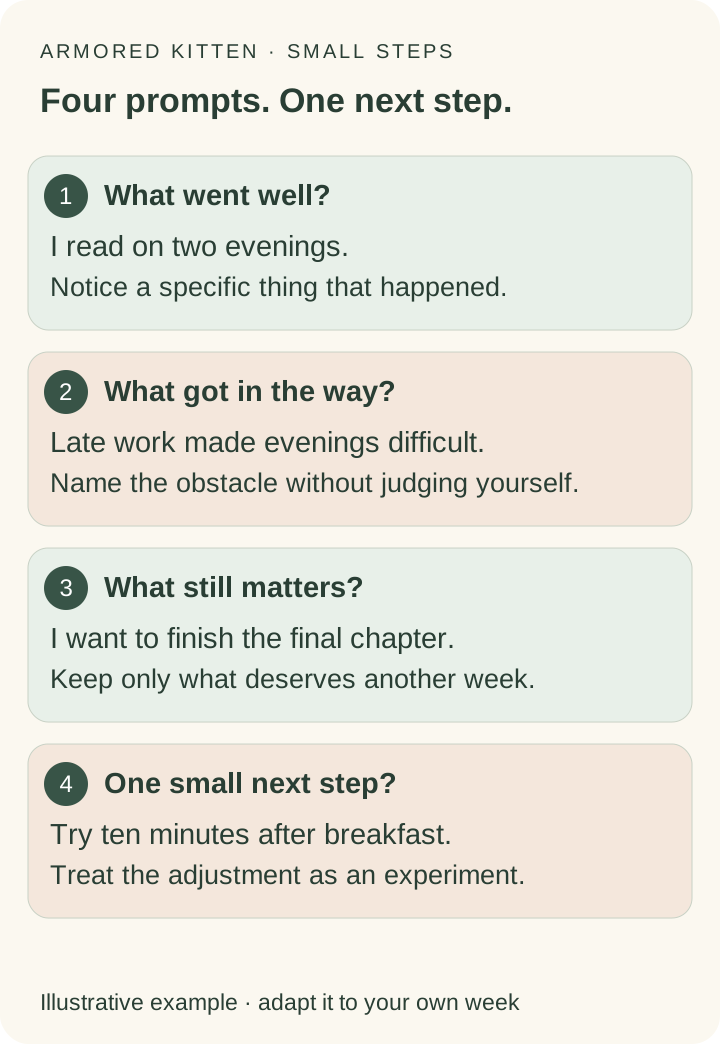
That next step responds to the evening obstacle. You can review how it went next week; mornings will not suit everyone.
Your four-question weekly review template
Copy the four headings onto paper or open the free weekly review worksheet. Start with one sentence per answer; you can leave one open.
Answer one question at a time
- What went well?
Name something specific you did, learned or enjoyed, including small actions.
- What got in the way?
Describe the practical obstacle: a changed schedule, missing information, limited access or an action that was too large.
- What needs carrying forward?
Choose what still matters. Keep, reduce, pause, remove or seek help with unfinished items.
- One small next step?
Choose an action you can recognise, such as reading one page or asking which document is needed.
Use what you remember or recorded; missing information can stay unknown. Check real deadlines and shared expectations before changing commitments. Optional unfinished reading does not automatically become extra reading next week.
When should you do a weekly review?
Choose the end of your week, or just before planning the next one. Set aside ten minutes for your first try and stop when you have a useful decision.
If you miss a review, start with the recent week.
A weekly review helps you choose what deserves attention. A daily priority plan gives the chosen action a place in a particular day.
Start your weekly review in our Telegram bot
In the Armored Kitten bot: answer one question at a time, check your review card and optionally save your next step as a goal. The worksheet is available in English, Simplified Chinese and Traditional Chinese. Normal age, trial and holder rules apply; see the access guide.
You can also use the same questions outside Telegram:
On paper: write the four headings and add your answers.
In your browser: use the free worksheet, then copy or print it. No account, email or wallet is required. Entries stay in the browser and are not sent to the bot or an AI service. Opening Telegram does not transfer them.
How the guided Telegram review works
Open the companion. Eligible existing users can begin from that link. New users complete the welcome and access steps, then send /review.
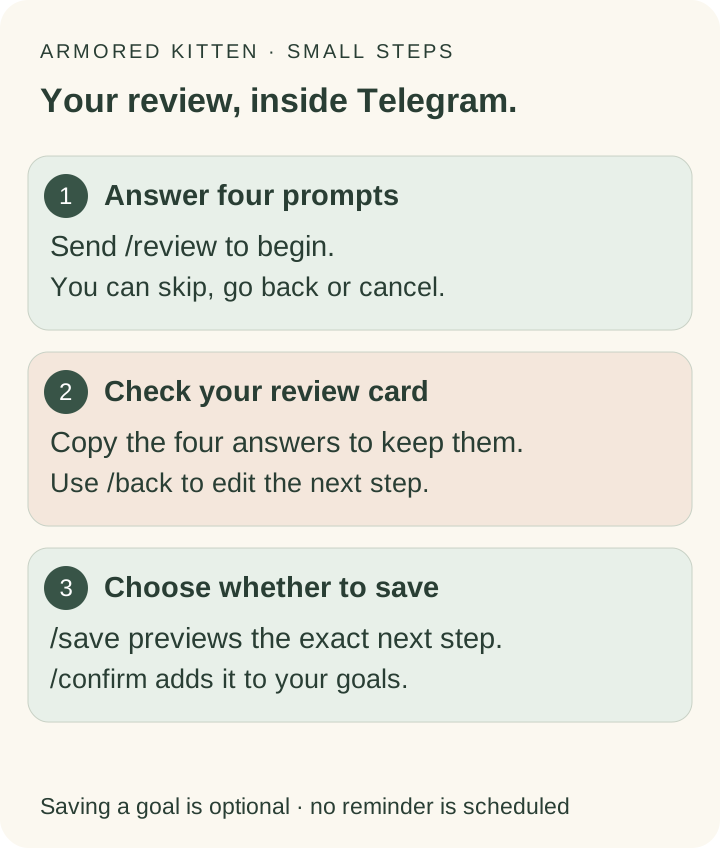
From four answers to an optional goal
- Start:
send
/reviewin your private chat and read the short privacy notice. - Answer:
reply to each question. Use
/skipto leave it open,/backto change the previous answer or/restartto begin again. - Check your card:
copy it to keep it, or use
/backto revise the next step. - Save if you want to:
/savepreviews the exact goal;/confirmadds it. Manage it with/goals. No reminder is scheduled. - Finish:
/cancelclears the temporary worksheet. Other commands end it and open their usual feature. Telegram keeps messages already delivered.
In-progress answers are held in the bot's encrypted profile and are not sent to the AI service by this worksheet. The session expires after one hour; a later worksheet message clears expired content. Starting another feature also clears it. Explicitly saved goals become available to the companion's existing AI features. Avoid sensitive details; see the privacy guide.
What if you want the AI to help you reflect?
Use /review to supply the four answers yourself. The separate /week AI reflection uses limited dated records and conversations within its recent seven-local-day window. It does not know everything that happened or treat missing check-ins as failure. See the weekly reflection tutorial for its limits.
Start with the week you have
Start your weekly review in the Telegram bot. Recognise one win, name one obstacle and choose your next step. You can keep that step as a goal if you choose. The browser worksheet is an alternative when you prefer to write outside the chat.
For a longer review, use the Restart and review workbook. To explore a particular obstacle next: