At the end of a day that got knocked off course, spend about ten minutes giving every unfinished item one of five labels: done, not sure, waiting on someone, still mine and ready, or let go. Check the "not sure" items before you plan to repeat them, send an update to anyone expecting a result, and only then look at tomorrow. Carry forward what is ready and fits the room tomorrow actually has. Leave the rest with a note or let it go.
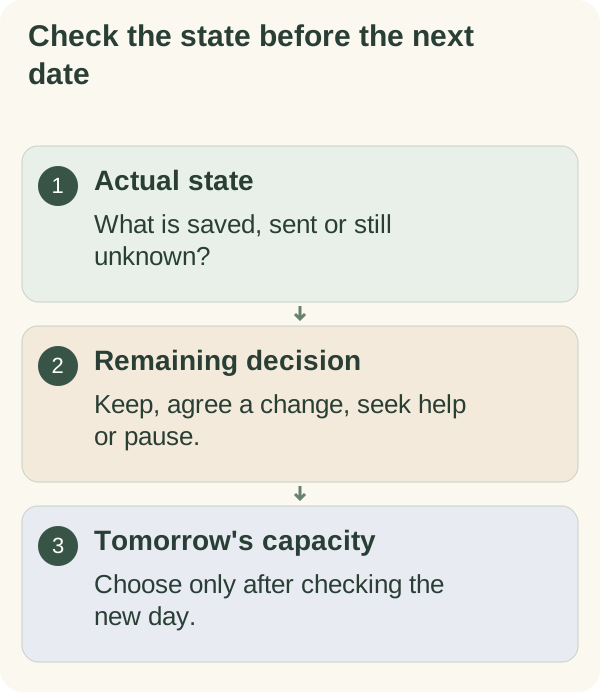
The usual end-of-day advice is to write down every open loop and pick tomorrow's top three. After an interrupted day that is not quite enough, because some of the open loops are half-done, some you cannot remember, and tomorrow may already be full. The close below deals with those first.
Five labels for what is left
Go through today's list once and give each item one label. Do not start doing anything yet.
| Label | What it means | What you do tonight |
|---|---|---|
| Done | Finished, and you know it | Tick it. Nothing else. |
| Not sure | You may have done it, or part of it | Check the actual record before deciding |
| Waiting | It cannot move until someone or something else does | Write who or what you are waiting for |
| Ready | Still yours, and you could start it next time | Write the first action and decide where it goes |
| Let go | It no longer matters, or never needed doing | Remove it, with a one-line note if useful |
"Not sure" is the label generic shutdown routines leave out, and it is the one an interruption creates. A form you were filling in when the phone rang, an email you think you sent, a payment that may have gone through: those need checking before they go anywhere.
Close the interrupted day
- State:
record what actually happened and what is unknown.
- Requirement:
identify any remaining genuine obligation.
- Decision:
keep, renegotiate, seek help, pause or remove the item as appropriate.
- Return:
leave a location and next action for work you may resume.
- Tomorrow:
choose commitments only after checking the new day's capacity.
Check before you repeat anything
For each "not sure" item, find evidence rather than relying on memory. Look in your sent folder for the email. Check the order history or account record for the payment, or contact the company, before trying to pay again. Open the form to see which section was saved. A tick on a general list, or a feeling that you probably did it, is not enough for anything with a consequence.
If you cannot check tonight, note what to check and where: "Check sent folder for the reply to the landlord before writing it again."
Safety, care and professional tasks keep their own instructions. This close organises your list; it does not change what those tasks require.
Write dependency notes, not promises
For every Waiting or Ready item, write the next action and anything it depends on. An example: "Draft saved; waiting for the updated figure. Next: check the approved project channel before continuing." That describes a dependency. "Finish draft tomorrow" would hide the missing information and promise a result before it is ready.
If someone expects delivery, give them an accurate update and agree any change. A short message is enough: "Today got interrupted. The report is two-thirds done and I'm waiting on the sales figure. I can send it Thursday midday. Does that still work?" A personal task-list edit does not alter their understanding.
Check tomorrow's room before filling it
Open tomorrow before you move anything into it. Count what is already fixed: meetings, travel, appointments, school runs, anything with a set time. Then use these rules.
- If tomorrow is an ordinary day, carry forward the Ready items with an outside deadline first, then one optional item at most.
- If tomorrow is already fuller than usual, carry forward only the items someone else is waiting on. Everything else gets a later day or no date.
- If tomorrow has no open time at all, carry nothing forward except messages you need to send. Find the next day with space instead.
The interruption is part of today's information. It is not a rule that tomorrow must hold two days' work.
Example: Maya's afternoon that vanished
A fictional example, written to show the steps in practice. Maya planned a quiet Tuesday afternoon to finish a report, pay a supplier invoice and book a dentist appointment for her son. At 1 p.m. an urgent problem at work took the whole afternoon.
At 6 she went through the list. The report: Waiting, because she still needed one figure from a colleague, Jo. She wrote "Waiting on Jo's figure; then section 4" and messaged her manager with a new time. The invoice: Not sure, since she had started the payment when the call came. She checked the bank record, found it had not gone through and labelled it Ready. The dentist booking: Ready, five minutes, no deadline this week.
Tomorrow already had three meetings. Following her rule, she carried forward only the invoice, because the supplier was waiting. The dentist booking went to Thursday.
What she changed afterwards: she had nearly paid the invoice twice on a previous interrupted day. Now "Not sure" is always the first label she checks, before anything else.
When you cannot remember what you did
Some interruptions are long or stressful enough that the morning is a blur. If that happens, do not reconstruct the whole day from memory. Treat every item with a consequence as "Not sure", check the ones that matter most, and leave the rest marked "not recorded". An unrecorded item is not proof that you failed to do it; it means you do not know yet.
If the interruption is still going on, for example a family situation that is not over, skip the full close. Write one line ("Paused everything at 2 p.m.; check messages first tomorrow") and stop.
Let optional work go cleanly
Ask whether an old item still serves a current need or interest. A postponed household project or a hobby can be paused or removed without creating a make-up task. Keep a return marker if it would be useful, with no invented deadline. The guide to stopping evening list rewrites helps if the close keeps turning into a second working session.
A ten-minute close card
CLOSING TODAY: ____________

Done: ____________________
Not sure (check where?): ____________________
Waiting (on whom / what?): ____________________
Ready (first action): ____________________
Let go: ____________________

Messages to send tonight: ____________________

Tomorrow already has: ____________________
Carrying forward (max what fits): ____________________

List closed at: ______
The last line is deliberate. Writing the time you closed the list gives you a clear point to stop, which is part of how Armored Kitten's small-steps approach treats evenings: one finished close, then rest.
Open tomorrow from current circumstances
In the morning, look at tomorrow's real commitments before taking on the carried items. Choose one visible first action and leave some room unallocated where you can.
Use plan an overwhelming day for the next plan. The weekly review template can help you reconsider unfinished items beyond a single day.
On the Smaller-day planning cards, the "Pause with a return note" card and the what-needs-attention line cover the same close if you prefer a printed version.
Questions people often ask
How long should the close take? About ten minutes for most days. If it is taking much longer, you are probably doing the tasks instead of labelling them.
Should I move everything unfinished to tomorrow, just in case? No. That is how a backlog starts. Move only Ready items that fit tomorrow's room, and give the rest a later day or no date.
What if someone is waiting and I cannot reach them tonight? Send the update anyway if their channel allows it, or note it as the first action tomorrow.
Is the close useful on an ordinary day too? It can be, but it is built for interrupted days, where "Not sure" and "Waiting" items are common.