When something knocks your day off course, stop for five minutes before doing anything else. Check what has changed: how much time is left, where you are, what you have with you and how much attention you can give. Keep the commitments that still stand, sort the rest into move, shrink, share or drop, and choose one next action. The morning's plan does not have to fit into the afternoon.
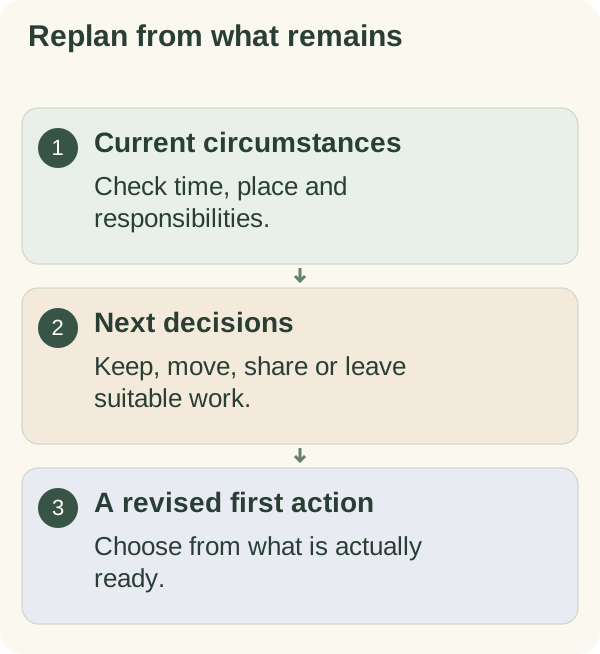
An interruption might be a phone call from school, a leak at home, a car that will not start, an urgent request from a manager or a family member who needs you. Whatever it is, the most common mistake afterwards is to pick up the old list where you left it and try to go faster. A short replan works better.
What the interruption changed
An interruption can change your location, your available attention, your materials or your responsibilities as well as the clock. Start from the circumstances you now know, rather than treating the earlier plan as a schedule you must recover. Fill in the two columns quickly.
| This morning's plan assumed | Now | |
|---|---|---|
| Time | A full afternoon | ____ hours left |
| Place | At my desk | ____ |
| Materials | Laptop, files, charger | ____ |
| Attention | Long focused stretches | Short bursts / patchy / fine |
| Responsibilities | Just my own work | + ____ |
Any row that changed rules out some of the old tasks on its own. If you are now at home without your work laptop, the report is not happening this afternoon, however much time is left.
Keep actual commitments visible
Identify appointments, shared responsibilities and work with an outside deadline. Check which arrangements can change and which need a conversation with someone else.
Moving an item in your own list does not reschedule an appointment or extend another person's deadline. If the interruption affects an agreement, explain through the usual channel and ask what options there are.
Do the hours-left sum
Write down the hours left in your working day, subtract anything that is already fixed, and you have the real amount of time for everything else. Most people skip this and simply feel behind.
REPLAN, 5 MINUTES

Time now: ______   Day ends at: ______
Hours left: ______
Minus fixed items (calls, pickups, travel): ______
Real time for tasks: ______

Still has to happen today:
  1. ____________________

Tell (who is affected by the change): ____________________

Move / shrink / share / drop:
  ____________________  ->  ______
  ____________________  ->  ______

Next action (one): ____________________
If the real time is smaller than the must-happen list, that is the moment to message people, not 5 p.m.
Sort unfinished work by its next decision
Some actions still need attention today. Others can move, become smaller, be shared or be removed. Keep work that is waiting on information in a separate state, so it does not look ready just because it is on the list.
For an illustrative afternoon, a necessary document submission may stay while organising a personal folder moves. The right choice depends on the actual consequences and any agreements involved.
Reset the remaining day
- Recheck:
what commitments and opportunities remain?
- Keep:
what truly needs attention before the day ends?
- Change:
what can move, shrink, be shared or be dropped?
- Begin:
what is the next useful action in the revised plan?
Example: Daniel's leak at 10:30
A fictional example, written to show the steps in practice. Daniel was working from home on a Wednesday with a plan: finish a client proposal by 4, a team call at 2, a supermarket shop at 5. At 10:30 water started coming through the kitchen ceiling from the flat above.
By 12:15 the water was off, the neighbour had a plumber booked and Daniel's kitchen was a mess of towels and buckets. He sat down for five minutes with the replan card.
Hours left in his working day: about four and a half. Fixed: the team call. Real time: just under four hours, with patchy attention because the plumber might knock. Still had to happen: the proposal, because the client meeting was the next morning. He messaged his manager: "Water leak this morning, all under control. Proposal will be with you by 5 instead of 4." He shrank the proposal plan to the sections the client meeting actually needed and moved the appendix to the morning. The shop became an online order for the next day. Next action: open the proposal at section 3.
The proposal went at 4:50. What changed afterwards: Daniel noticed he had spent the first twenty minutes after the leak trying to work as if nothing had happened. Next time something interrupts him, the card comes first. It is the small-step habit behind Armored Kitten's approach to planning: after a disruption, one honest look at what is left, and one next action.
When the interruption is still going on
Most replanning advice assumes the interruption is over. Often it is not: you are waiting for a call back, a child is home from school, the tradesperson has not arrived. Use these rules.
- If you do not know when it will end, plan only the next hour, and choose tasks you can stop at any moment.
- If you are waiting for a call or a visitor, pick work that does not suffer from being cut off: replies, booking things, short admin.
- If someone else's deadline will slip, tell them now with what you know: "Something urgent has come up at home. I'll update you by 3 on whether I can still send it today."
- If the interruption needs all your attention, stop the work plan entirely. Write one line about where you stopped and come back to the replan when it settles.
Leave a return note for work you move
Write the current state and next action beside the task. "Continue the form from the supporting-documents section" gives you more to return to than "finish everything tomorrow".
If a task depends on an answer, record the question or the person you need to ask. Do not silently turn waiting time into another personal deadline. The guide to returning to a task after an interruption covers picking a single task back up.
Decide what tomorrow actually needs
Look at unfinished items one at a time before moving them all forward. A task that no longer matters does not have to become tomorrow's backlog. One that still matters may need a different slot, more information or help.
Leave room for the commitments tomorrow already has. Replanning is a chance to make the list more accurate, not to hide an impossible amount of work inside a new date.
The daily planner can help you write a revised priority and opening action. If the day needs a gentler version, read how to make a smaller plan.
Plan an overwhelming day for the illustrated exercise. The browser page cannot change outside appointments or move saved Telegram tasks. Review the actual controls and any confirmations before making changes in the companion.
Once the remaining commitments are checked, the first of the Smaller-day planning cards begins with "Recheck the day after circumstances change", which is exactly this moment.
Questions people often ask
Should I just work later to make up the lost time? Sometimes that is the right call for one item with a deadline. As a default it tends to push the problem into tomorrow.
How soon after the interruption should I replan? As soon as you can give it five minutes. Replanning at noon leaves more choices than replanning at 4.
What if I keep getting interrupted all day? Plan in short blocks and keep the must-happen list to one item. If this happens most days, the guide to keeping a work routine when every day looks different may help.
Do I need to tell people every time my plan changes? Only when the change affects something they are relying on.