Recover your place
- Step 1Check what was saved or sent
- Step 2Pick one next action
- Step 3Leave a return note
Before you carry on, check where the work actually stands. Open the right version, confirm what was saved, sent or paid, and look for anything that changed while you were away. Then choose the next action from that state, not from memory. If you get a few seconds of warning before the next interruption, leave yourself a short parking note so the return is quicker.
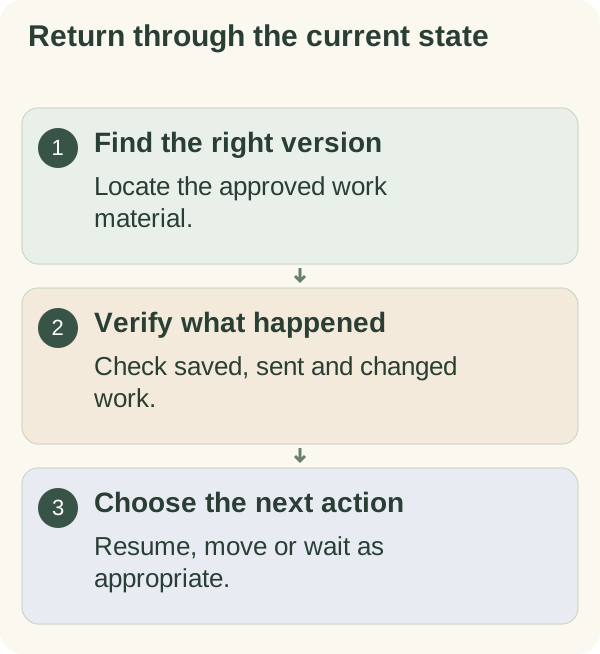
Most articles on interruptions focus on getting your concentration back: leave yourself a cue, take a moment, then dive in. That helps, but it skips a practical risk. While you were away, something may have been sent, saved over or changed by someone else, and diving back in from memory can mean sending a message twice or editing an old copy. This page puts the check first.
Reopen the work, then verify its state
Find the correct file, record or task. Look for the last saved change and any updates made by other people while you were away. In shared work, follow the team's version and ownership practices rather than assuming the screen you left still shows the current state.
If the task involves a consequential action such as a payment or submission, confirm whether it already occurred before repeating it. A vague return note should never be treated as proof that an action is still pending.
Re-enter an interrupted task
- Location:
identify the correct material and current version.
- State:
check what was saved, sent or completed.
- Change:
look for new information or another person's update.
- Next action:
choose the next useful step from the current state.
- Boundary:
decide how far the available work period can reasonably go.
The 30-second parking note
When someone appears at the door or the phone rings, you rarely have time for a proper handover. You usually have time for three short lines. Keep a sticky note or a blank note on screen for exactly this.
WAS DOING: ________ (file or item, and where in it)
LAST DONE: ________ (the last thing I am sure happened)
NEXT: ________
"Last done" is the line that saves the most trouble. It separates what you know happened from what you were about to do, which is precisely the detail memory blurs.
Replace a vague intention with an observable action
For example, an illustrative note might say: "Draft saved. The second attachment has not been checked. Next: compare its date with the request before preparing a reply." That is more usable than "finish email," because it identifies the unresolved check.
If you cannot tell where you stopped, spend the first part of the session finding out. Guessing may create more work than a short reconstruction of the facts.
How much to check depends on how long you were gone
| Time away | What to check before continuing |
|---|---|
| A few minutes | Read the parking note or the last few lines; carry on |
| An hour or two | The note, plus any messages about this task since you left |
| Overnight | The current version, new messages, and whether the plan for today still puts this first |
| Several days or more | Everything above, plus whether the request, deadline or owner has changed |
After a long break, it often helps to write a fresh one-line result for the session rather than trying to finish the old plan exactly where it stopped.
Example: Alex and the half-sent confirmations
An illustrative example (the person is made up): Alex volunteers as the bookings coordinator for a community choir and was sending confirmation emails to twenty people when a long phone call took over the rest of the afternoon.
Back at the desk two hours later, Alex's memory said "about halfway". The obvious move was to start again from around number ten. Instead Alex checked the sent folder and found that twelve had gone, including one sent twice by accident before the call. Alex sent a short apology to that person, then continued from number thirteen.
What Alex changed afterwards: for any batch of messages, Alex now ticks each name on the list as it is sent, so "last done" is always visible on the page rather than in memory.
When you cannot tell whether something already happened
This is the situation most likely to cause real problems, and it deserves its own rules.
- If it was a message or email, look in the sent folder or message history before sending again.
- If it was a form or online submission, look for a confirmation email, a reference number or the status shown in your account with that organisation.
- If it was a payment, check your account or statement before paying again. If it is still unclear, contact the organisation that was being paid and ask what they have received.
- If someone else may have done it while you were away, ask them directly rather than assuming.
- If you still cannot tell, write down what you know and what you do not, and choose the action that is easiest to undo. Asking "did this reach you?" is easy to undo; sending a second payment is not.
Leave a restart note when another interruption arrives
When circumstances allow, record the location, current state and next action before switching tasks. If the interruption is urgent, attend to it; write the note afterwards if you can still do so accurately. The note is a support, not another rule to fail.
Keep confidential details in an approved work system. A general personal note can point to the project location without copying private documents into it.
Reconsider whether the task still comes first
An interruption may change the day's priorities. After checking the work's state, decide whether it should resume now, move to a later opening or wait for information. Returning does not require continuing the original plan unchanged.
If the interruption has rearranged the whole day, replanning a day after an unexpected interruption covers the bigger picture. For this single task, one checked step back in is enough, which is the same small-step approach behind every guide in Armored Kitten's planning and reflection hub.
Use plan an overwhelming day if several tasks now compete for the same time. The weekly review template can hold work that needs a deliberate return occasion.
Use the restart-note card in the One-session work kit for the work location, verified state, missing information and next action.
Questions people often ask
Why does it feel so hard to restart after an interruption? Part of your attention is still searching for where you were. A parking note or a quick state check answers that question, so you can stop searching and start working.
Should I finish the interruption or the original task first? Deal with whatever is genuinely urgent. Then return through the state check, rather than switching back mid-thought.
What if I get interrupted constantly? Make the parking note a habit and choose smaller results that can stop cleanly. If interruptions come from the same source, it may be worth agreeing set times for questions.
Is it worth re-reading everything before continuing? Not usually. Read enough to confirm the last thing that happened and the next step. After a long break, check messages and changes too.