Make your first session about finding out, not finishing. Open the letter, email or account, find the organisation's current instructions, and write down what they actually ask for and by when. That one step usually shrinks the task, because avoided admin tends to feel bigger while you do not know what it involves. After that, move the task up one state at a time: requirement found, materials gathered, submitted, confirmed.
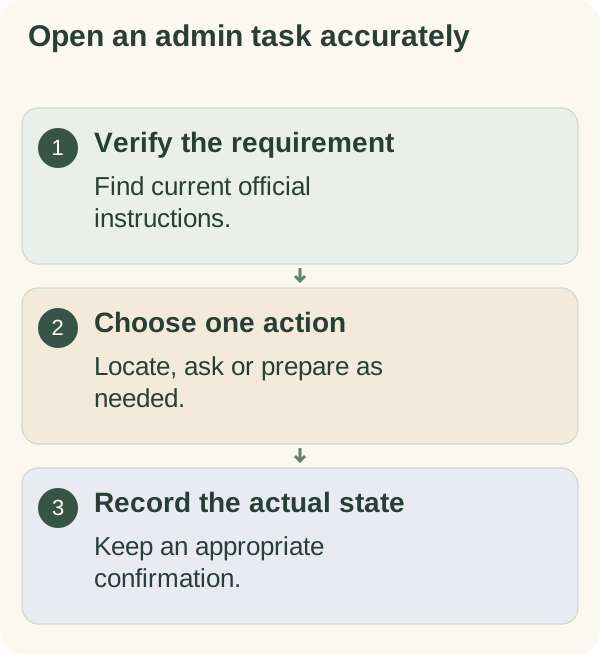
Common advice for avoided tasks is to break them into tiny steps or do five minutes. That is useful once you know what the steps are. With admin, you often do not: the form, the deadline and the documents are unknown until you look, and the not-knowing is much of what you are avoiding. This guide starts there.
This page covers organising the task. It does not give legal, tax or financial advice; where those questions come up, the organisation's own guidance or a qualified adviser is the right source.
Why admin is so easy to put off
Admin tasks share a few features that make them easy to avoid. The requirement is often unclear until you read something you have not opened. The consequences of a mistake can feel larger than the task itself. The work comes in many small, dull pieces across different places: a letter, a website, a drawer of documents. And there is rarely a natural moment to begin.
Knowing which of these applies helps you pick the first step. If it is the unopened envelope, the first step is opening it. If it is the scattered documents, the first step is gathering them. If it is fear of getting it wrong, the first step is reading the instructions without committing to anything.
Check what the task actually requires
Use the relevant organisation's current instructions. Confirm deadlines, submission methods and requirements rather than relying on an old checklist. If legal, tax, medical or financial advice is needed, seek the appropriate qualified help.
If you do not know the requirement, make finding it the first action. A planning score or a guessed deadline cannot replace accurate information about a consequential task.
Open the admin task
- Name:
describe the matter without vague labels.
- Verify:
identify the official requirement or missing question.
- Locate:
find the form, record or contact channel needed.
- Act:
choose one appropriate step within the current opening.
- Record:
note the new state and next action.
The five states of an admin task
Most avoided admin sits in the first state for weeks. Naming the states shows that every session can move it up one, even if submission is still some way off.
| State | What it means | Typical next step |
|---|---|---|
| 1. Not looked at | You know it exists but not what it asks | Open it and read the instructions |
| 2. Requirement known | You know what is needed, how and by when | List the documents or information you need |
| 3. Materials ready | Everything needed is gathered in one place | Fill in and check the form or message |
| 4. Submitted or sent | You have done your part | Keep the confirmation or reference |
| 5. Confirmed | The organisation has acknowledged or accepted it | File the confirmation and close the task |
Write the current state next to the task on your list. "Car registration: state 2" tells you far more than "car registration" on its own.
Choose a first result smaller than submission
For example: "Find the current application instructions and list the documents still needed." That is a recognisable result. "Finish the application" may conceal several unanswered questions and make the opening difficult to choose.
When you reach a payment, declaration or submission, verify the information and consequences before proceeding. Do not repeat a consequential action because you cannot remember whether you already completed it; check its actual state.
A first-session script
Copy this into a notebook or the daily planner and fill it in as you go. It is designed for the very first sitting, when the task is still in state 1.
THE TASK: ________________________ (plain words, e.g. "renew parking permit")
WHERE IT LIVES: letter / email / online account / other: ________
TODAY I WILL ONLY: open it and find out what is needed.

WHAT THEY ASK FOR: ________________________
BY WHEN: ________ (from the official source, not memory)
HOW TO SEND IT: ________
WHAT I ALREADY HAVE: ________
WHAT I STILL NEED: ________
QUESTION FOR THEM, IF ANY: ________

STATE NOW: 1 / 2 / 3 / 4 / 5
NEXT SESSION: ________ (day and the one step)
If you have a question for the organisation, a short message is enough: "I've received your letter about ________ (reference ________). Could you confirm what you need from me and the deadline?"
Example: Sam and the envelope on the shelf
Illustrative example only; this is not a real person's story. Sam had a letter from a professional membership body sitting unopened on a shelf for three weeks. Sam assumed it was about a renewal that would need forms, documents and a long phone call.
Sam set one goal for a single sitting: open it and fill in the first half of the script. The letter turned out to ask for an updated address and a signed one-page declaration, with a deadline still two weeks away. Sam updated the address online that evening, which moved the task to state 3, and printed the declaration.
The declaration sat for another four days, because signing and posting it needed a stamp Sam did not have. What Sam changed: for any admin task, the materials list now includes the boring physical items, such as a stamp, a printer or a photo of a document, so state 3 really means ready.
When the deadline may already have passed
Avoided admin sometimes means a missed date. This is where people freeze longest, and where most guides say nothing.
- If you think a deadline has passed, contact the organisation and ask what is possible now. Many have a process for late responses, and you will only learn what applies to you by asking.
- If you are not sure whether it has passed, check the date on the official letter or account, not your memory of it.
- If there may be legal, tax, money or benefit consequences, get advice from the organisation itself or a qualified adviser before you act. This page cannot tell you what applies.
- If there are several overdue items, list them all with their states before tackling any. One list is less frightening than a pile, and it shows which has the nearest real deadline.
- If dread about the task is affecting your sleep or daily life, talking to someone you trust, or to a doctor, is a reasonable next step alongside the admin itself.
For admin that keeps slipping week after week, a life-admin checklist for tasks that keep slipping helps you see the whole set at once.
Keep private material in the right place
A task note can point to a secure folder or official account. Avoid copying personal identifiers, passwords or confidential documents into a general planner. Follow the relevant organisation's authorised process when someone is helping you.
Finish with evidence of what happened
Record whether you found information, requested it, prepared a draft or submitted something. Keep an appropriate confirmation when available. A sent request is not the same as acceptance or completion.
Moving a dreaded task from "not looked at" to "requirement known" is exactly the kind of step Armored Kitten is built around: small, manageable and real, even though it is not the finish. You will find more guides like this in the planning and reflection hub.
The NHS to-do-list guidance includes trying a short opening for an avoided task. Use start a task to choose your action; it does not submit paperwork or make a decision for you.
Use the result and review fields in the One-session work kit to distinguish the opening action from the eventual submission or acceptance.
Questions people often ask
What if I open it and it is worse than I thought? Then you now know, and you have more time to deal with it than if you had waited longer. Write down what it asks, then decide whether you need help from the organisation or an adviser.
Should I do all my admin in one go? A regular admin slot can help, but a big catch-up day is easy to postpone. One task moved up one state is a good session.
How do I know when an admin task is really finished? When you have the organisation's confirmation, or you have checked that nothing further is needed. Sending your part is state 4, not state 5.
Can someone else do it for me? Sometimes, through the organisation's own process for helpers or representatives. Check what they allow before sharing any personal details.