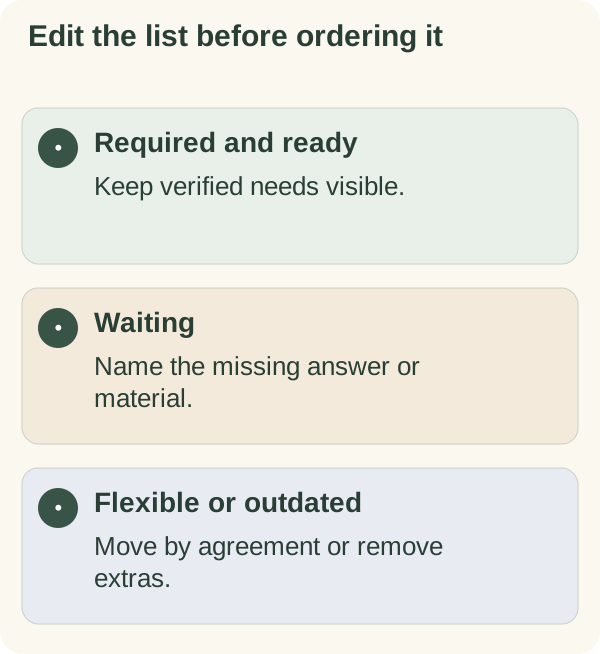
Cut the list before you put it in order. First work out how many hours are actually free once meetings, preparation and breaks are taken out. Then give every task one of four labels: required today, waiting on someone, flexible or outdated. Keep only the required and ready work that fits those hours, and tell anyone affected about the things you move. Ranking a list that is too long only decides which tasks you will fail to reach.
Most advice on this question offers a cap ("keep it to three tasks") or a ranking method. A cap ignores how much time you really have, and a ranking keeps every task on the page. This guide gives you a ten-minute edit that starts from your actual day and ends with a list you could plausibly finish.
Count the hours before you count the tasks
Start with the calendar, not the list. Take your working hours, then subtract everything that is already spoken for.
TODAY'S REAL TIME
Working hours:                         ____ h
Minus meetings and calls:            - ____ h
Minus preparation and travel for them: - ____ h
Minus breaks and lunch:              - ____ h
Minus a buffer for messages and surprises: - ____ h
= Time for list work:                  ____ h
An illustrative day: eight working hours, three in meetings, half an hour of preparation, an hour for lunch and breaks, and an hour of buffer leaves two and a half hours. That number, not the length of the list, decides how much you keep.
The buffer is not optional padding. On a busy day, messages and small requests arrive whether or not you planned for them. If you leave no room, they take time from the list anyway.
Check the requirements behind the labels
Verify genuine deadlines and commitments with the relevant source. A task may feel urgent because it is old, repeatedly copied or easy to notice. Keep that feeling separate from an actual requirement or consequence.
Where decisions have legal, financial, safety or other consequential implications, use the appropriate process and advice. A generic planner cannot determine those requirements for you.
Edit today's work list
- Required:
keep tasks with verified needs today visible.
- Waiting:
identify missing information and the next appropriate follow-up.
- Flexible:
move work that can realistically be done later.
- Outdated:
remove optional work that no longer matters.
- Next:
choose one visible action from the remaining ready tasks.
Four questions that sort a task in seconds
Ask them of each line, in this order, and stop at the first yes.
| Question | If yes |
|---|---|
| Is someone expecting this result today, by agreement? | Required: keep it |
| Am I waiting on information or approval before I can finish it? | Waiting: replace it with the follow-up |
| Would doing it tomorrow or later this week change nothing important? | Flexible: move it to a dated place |
| Would anyone notice if it disappeared from the list for good? | If no, it is outdated: delete it |
Tasks that survive all four questions without a yes are usually vague. Rewrite them as a result before deciding where they belong.
Turn a waiting task into its actual next action
For example, "finish proposal" may be blocked on a confirmed figure. The ready action might be requesting that figure or reviewing the section that does not depend on it. Do not schedule the final submission as if the missing information were already available.
Make a moved task a decision
If another person expects the result, communicate and agree changes where necessary. Moving an item in a personal calendar does not renegotiate a deadline. Record the current state so that it is clear what remains.
A short message is usually enough:
"Today has filled up with ________. I can get ________ to you by ________
instead of today. If today is essential, let me know and I'll move
________ to make room."
Keep later work in a place you can review rather than spreading it across several competing lists. Avoid assigning every deferred task to the same tomorrow morning.
Example: Sam's 23-line Monday
An illustrative example (the person is made up): Sam coordinates projects remotely for a small agency. On Monday the list had 23 lines, many copied forward from the previous week, and the calendar held four meetings.
Sam counted first: two and a half hours of real list time. Then the four questions. Five tasks were required today. Four were waiting, so Sam replaced them with two follow-up messages (two of the four were waiting on the same person). Nine were flexible and went onto specific days later in the week. Three turned out to be outdated, including a reminder about a meeting that had already happened. Two were vague and got rewritten as results.
The final list had seven lines, and the required five took most of the time. Sam finished them plus one flexible task. What changed the following week was the order of the routine: Sam now counts the hours on Friday afternoon for Monday, because Monday mornings were when the copying-forward happened without thinking.
When everything left really is due today
Sometimes the edit leaves more required work than hours. Most guides stop at "prioritise". Here is what to do instead.
- If two required tasks clash, ask the people expecting them which matters more today. Asking in the morning gives them choices; announcing at five gives them none.
- If a smaller version would meet the need, offer it: the summary instead of the full report, the first section on time and the rest tomorrow.
- If the list came from someone else, such as a manager or client, show them the hours count and the required items, and ask what should move. You are not refusing work; you are making the trade visible.
- If you are tempted to cut breaks or lunch to fit it all in, treat that as a sign the conflict needs raising, not hiding.
For the evening before, how to stop rewriting tomorrow's to-do list all evening helps keep the list from growing back overnight.
Leave capacity visible
Include meetings, preparation and required breaks in the available time. If necessary work still exceeds capacity, raise the conflict with the appropriate person instead of hiding it under a more detailed priority ranking.
A shorter list is how Armored Kitten approaches a heavy day: pick the work that fits, start with one manageable step and let the rest have a proper place instead of a guilty one. More of that thinking is in the planning and reflection hub, and how to prioritise when everything feels important covers ordering what is left.
Use plan an overwhelming day to compare necessary and flexible tasks. The daily planner gives you a place to write one next action after the list is reduced.
Use the working-week card in the One-session work kit to record waiting work, capacity conflicts and the agreements that need attention.
Questions people often ask
How many tasks should be on a daily list? There is no right number. The hours count tells you: a day with two free hours fits far less than a day with six, whatever method you use.
Should I delete tasks or just move them? Move anything someone still needs. Delete anything nobody would miss. A list that only grows becomes a list you stop reading.
What if I keep copying the same task forward? After it has moved a few times, ask the four questions again. It is often waiting on something, vague, or no longer needed.
Is it better to do this in the morning or the night before? Either works. The night before is calmer; the morning catches overnight changes. Some people count hours the night before and sort tasks in the morning.