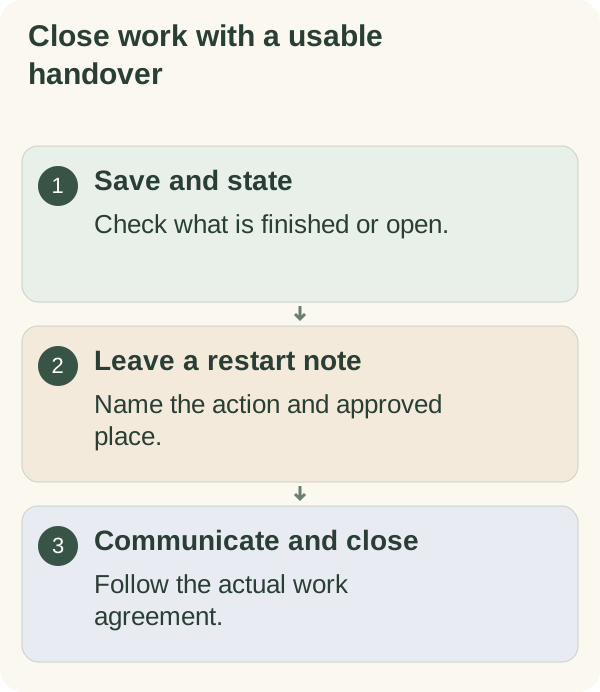
When you work from home, end the day in five steps: save the work, write down its true state, leave yourself a restart note, send any handover other people need, and then do one physical thing that tells the room work is over. The note is for you; the handover is for them. Mixing those two up is a common reason a home workday ends badly, or never quite ends.
Why the end of a home workday blurs
In an office, leaving is the shutdown. You pack up, walk out, and the commute does the rest. At home, nothing changes when you stop. The laptop is still on the table, the chat app is still on your phone, and the unfinished task is a few steps away. It is easy to drift back at 9 p.m. "for a minute".
Most advice says to set a hard stop and tidy your desk. Both help. What they skip is the part that makes stopping safe: knowing that the work is saved, that anyone waiting on you has been told, and that tomorrow you will know where to pick up. Without that, a hard stop just moves the worry to the sofa.
Sort the leftovers first
Before you write anything, look at what is still open and put each item into one of three groups.
| Type | What it means | What to do before you stop |
|---|---|---|
| Real deadline | Someone expects it today or first thing tomorrow | Finish it, or tell them now through the agreed channel |
| Open question | You cannot continue until someone answers | Send the question and note who you asked |
| Preference | You would like it done; nobody is waiting | Write a restart note and leave it |
If a deadline cannot be met, say so through the usual work channel rather than hiding it in tomorrow's list. A message such as "The draft will reach you by 11 tomorrow, not tonight; the figures need one more check" is far easier for a manager or client than silence.
Follow your workplace's rules on security, availability and handover. A personal shutdown routine does not override an agreed on-call duty, and it is no reason to leave sensitive material open on a shared screen.
Close the working day
- Save:
confirm important work is stored in the approved place, not only on your desktop.
- State:
note what is finished, what is sent and what is still open.
- Restart:
write one next action and where its material lives.
- Handover:
send any update another person needs through the appropriate channel.
- Boundary:
close work apps and do your end-of-work action.
A shutdown script you can copy
Some people find it easier to follow a fixed script than to think through each step at 6 p.m. Paste this into your notes and run through it at the end of each workday.
END OF WORK: ______ (day/date)

1. Saved?           [ ] in: __________________
2. Today's state:   done ______ / sent ______ / open ______
3. Waiting on:      ______ (asked ______ at ______)
4. Handover sent?   [ ] to ______ via ______   [ ] none needed
5. Restart note:    "Next: ________________________
                     Material is in: ________________"
6. Closed:          [ ] email  [ ] chat  [ ] work browser tabs
7. Boundary action: ________________________
Write a restart note your morning self can use
"Continue report" forces tomorrow's version of you to rebuild the context. A useful note says where the work is, what state it is in and the exact next move. For example: "Draft saved in the project folder. Introduction done. Next: compare the two figures in the results table before touching the conclusion."
Keep the note with the work, in an approved task tool or as a comment in the document itself. A personal notebook or planning app is fine for "Next: check the figures", but it is the wrong place for client names, contract details or passwords.
Example: Alex and the kitchen-table office
The example below is illustrative; the person in it is not real. Alex works for a small design studio from a laptop on the kitchen table. Colleagues are spread across two time zones, so messages arrive until late in the evening. Alex usually stopped work around six but kept the laptop open "in case", and often answered messages during dinner.
Alex tried the script for two weeks and changed three things:
- The handover moved earlier. At 5:45 Alex posted a short update in the team channel: what was done, what was waiting and when Alex would be back online. Fewer evening questions arrived because people already had the answers.
- The restart note went into the project tool. Before, it was a sticky note on the laptop lid, which got moved or lost when the table was cleared for dinner.
- The boundary became physical. The laptop went into a drawer and the chair was pushed in. On dry evenings Alex added a short walk around the block.
The part that did not work was a fixed 5:30 stop on Thursdays, when a weekly call ran late. Alex now treats "after the call" as the Thursday stop time instead of fighting it.
When home and work share the same room
Typical advice suggests a separate office with a door. Many people do not have one. If your workspace is the dining table, the sofa or a corner of a bedroom:
- If the table is needed for dinner, make clearing it the boundary action. Keep equipment in one box or bag so it takes a minute.
- If you cannot put the laptop away, close it and cover it, or turn it to face the wall. Anything that makes it look different from work mode helps.
- If someone else shares the room, tell them what to expect: "From six the table is free" is clearer than a closed laptop they have to interpret.
- If you share a computer with family, sign out of work accounts or switch user, so nobody sees work material by accident.
When messages keep arriving after you stop
Teams across time zones, clients who write late and group chats that never go quiet can all pull you back. A few options, depending on what your role allows:
- If you are not on call, mute work app notifications on your phone at your stop time. The notification review guide covers how to choose exceptions.
- If you are on call, keep the alerts your agreement requires and quiet the rest. A personal routine should never undo a work commitment.
- If you are unsure what is expected, ask your manager. "What response time do you expect outside my hours?" is a fair, practical question.
Keep the shutdown short
If the shutdown turns into a long admin block, it stops being a shutdown. Keep the steps that protect the work and make tomorrow easier. Weekly admin such as expense claims or inbox clearing belongs in its own slot.
Ending work on purpose is a small daily version of what Armored Kitten is for: one clear step, so the rest of the evening belongs to you. The planning and reflection hub has more on planning a working week.
Use working alone accountability for a session card. Then wind down for the evening to choose what follows your work boundary. If you would like a gentle signal that the workday is over, a short walk is one option; the guide on making walking part of your day has practical ideas for fitting one in.
Use the work-period card in the Morning and evening preparation cards for work state, next action and handover needs, keeping confidential material in your approved system.
Questions people often ask
How long should an end-of-day shutdown take? Usually five to ten minutes. If it takes longer, look for admin that belongs somewhere else in the week.
Should I write tomorrow's whole to-do list before logging off? One clear next action is usually enough. Plan the rest when you start, with the morning's messages in front of you.
What if my manager messages after I have stopped? Follow what your role and agreement say about availability. If nobody has said, ask once and agree an expectation.
Can I keep work notes in a personal app? General notes like "check the figures" are fine. Keep confidential details in the tools your employer approves.