Do not start with the pile. Set up one private intake place for anything new, deal with the documents you need now, and put the existing backlog into a dated box to work through in short rounds later. Choose categories last, once you can see which papers you actually go looking for. And nothing gets thrown away or deleted until you have checked whether you need to keep it.
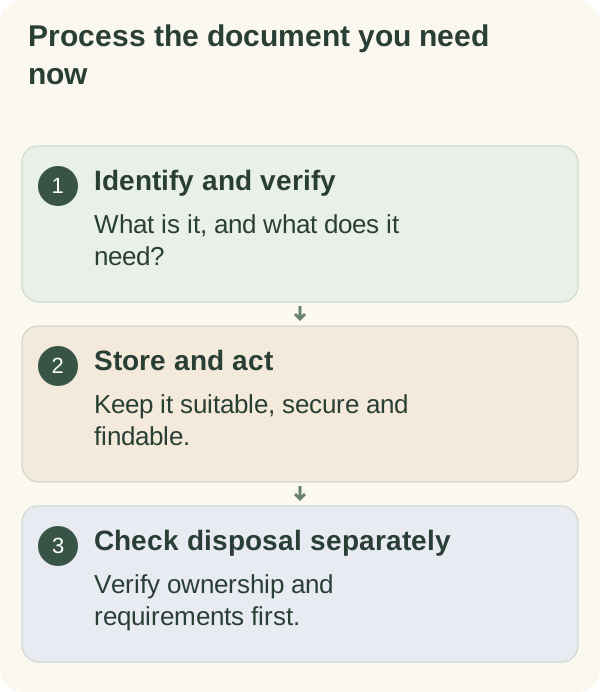
Paperwork is a good test of the Plan your days approach, because you never need to sort all of it at once: only the next document that matters, then the one after that.
This page is about organising. It does not tell you what any document means for your tax, money, health or legal position, or how long you must keep it. The organisation that issued it, official guidance for your country or a qualified adviser can answer that.
Why the big sort stalls
Most paperwork advice starts with "gather everything into one place and sort it". That needs a free afternoon, a large clear floor and dozens of keep-or-throw decisions you may not be able to make quickly. It also mixes the letter that needs a reply this week with statements from years ago, so the urgent one gets buried again. When the afternoon runs out, the pile is spread across the floor and harder to deal with than before.
Starting from the flow, not the pile, avoids all of that. New documents get handled properly from today, the ones you need now get found, and the backlog shrinks in short rounds without blocking anything.
Set up one intake place
For paper: a single tray, folder or box, kept somewhere private and dry rather than on a hall table visitors pass. Everything new goes there: post, school letters, receipts you might need.
For digital files: a single folder called something like "Inbox" in a private, secure location you already use for personal files. Downloads, scanned letters and email attachments you need to keep go there. Work documents follow your employer's rules, not your home system.
A shared or open folder is not a suitable place for personal records. If others in your home use the same device, keep the intake folder in your own account.
Three questions for every new document
Process one document
- What is it?
Who sent it, and who is it about?
- Does it want something by a date?
A reply, a payment, a form, an appointment. Write the date where you will see it.
- Where will I look for it again?
Choose the place you would naturally search, not an ideal system.
The answers send each document to one of four places:
| Answer | Where it goes | Example |
|---|---|---|
| Needs action by a date | Action folder, with the date on your list | A form to return, a renewal letter |
| Waiting for someone else | Waiting folder, with a date to chase | A copy of something you sent off |
| Keep for reference | A reference folder, rough category for now | A contract, a warranty, a certificate |
| Not needed | A "check before disposal" pile | An advert, a duplicate, an old envelope |
Notice that "not needed" does not go straight in the bin. It waits until you are sure, especially for anything with your name, address or account details on it.
Find the document you need now
If you started this because something is due, go straight to it. Search the intake place first, then the most likely spot in the backlog. Once found, run the three questions and put the next action on your list. The life-admin checklist shows how to track what it asks of you.
Box the backlog and work through it in rounds
Put the existing pile into one or two boxes, write today's date on them and stop. The backlog is now contained and is not mixed with new post.
Open the box for short rounds when you have a little time. Work from the top, which is usually the newest. Look for anything with a date or a request first, because older documents are less likely to need action. Each item goes through the same three questions. Items you are unsure about go back in the box; that is still progress.
Let categories appear from use
After a few weeks, you will notice which documents you actually go looking for. Those become your categories. Common ones that people end up with:
- the home: tenancy or mortgage papers, utilities, repairs;
- each person in the household: ID documents, school, health letters;
- work and income;
- vehicles, if you have one;
- guarantees and instructions for things you own.
Start broad. A folder you can find in ten seconds beats a detailed system you cannot remember. A useful test is the two-minute find: if someone asked you for a particular document, could you put your hand on it within two minutes? If not, that category needs a clearer place.
A document intake card to copy
DOCUMENT INTAKE
Paper intake place: ______________
Digital intake folder: ______________

For each new item:
1. What is it / who is it about?
2. Does it want something by a date?  Date: ________
3. Where will I look for it again?

Goes to:  Action / Waiting / Reference / Check before disposal
Backlog box dated: ________   Next short round: ________
Example: Sam's carrier bag of post after a move
Here is a made-up example to show how it can work. Sam moved flats and ended up with several months of post in a carrier bag, plus a downloads folder full of statements and tickets. The idea of sorting all of it had been on the list for weeks.
Sam set up a tray in a bedroom drawer and an "Inbox" folder in the account already used for personal files. For a week, each day's post went through the three questions. The bag became the dated backlog box. In the first short round, Sam found a letter asking to confirm the new address by a date two weeks away, which became the most urgent action on the list.
After three rounds, categories had started to appear by themselves: the flat, work, the car, and a folder for Sam's own ID and health letters. One change came out of the experiment. Sam had started photographing every letter, and the photos became a second backlog to sort. Now only documents Sam might need while away from home get photographed.
Before anything leaves the house or the hard drive
Disposal is where organising can go wrong, and most quick guides skip it. How long to keep a document depends on what it is and where you live, so this page gives no retention periods. Some concrete rules instead:
- If you are not sure whether to keep something: keep it for now, and check official guidance for your country or ask the organisation that issued it.
- If it contains personal details: dispose of it securely, for example by shredding paper, rather than putting it in the recycling as it is. Delete digital copies properly, including from any backup you control.
- If it is an original that might be needed later, such as a certificate or a signed agreement: do not discard it because you have a scan, unless you have confirmed a copy is accepted.
- If you are handling papers for someone else, such as a parent: keep their documents in a separate box, check what you are allowed to deal with, and involve them where you can.
- If you are dealing with a relative's papers after they have died: keep everything until you have suitable advice on what is needed. Do not rush the clear-out.
- If you find something important is missing or damaged: contact the organisation that issued it and ask how to get a replacement.
Keep it going with a weekly glance
Once a week, empty the intake place using the three questions and check the Action and Waiting folders. A slot in your weekly review is enough; there is no need to schedule a full archive project.
Start a task helps you pick the one document to begin with when everything feels urgent. The "Open a life-admin item" card in the Small home reset kit records a non-sensitive reference and the next action for the document you need now.
Questions people often ask
Should I go paperless? Only where it makes finding things easier and the original is not required. Scanning everything creates a digital backlog unless each file gets the same three questions.
What folders should I start with? Action, Waiting and one broad Reference folder. Let more detailed categories appear after a few weeks of use.
How long should I keep documents? It depends on the document and your country. Check official guidance or ask the issuing organisation, and keep things until you know.
What do I do with the backlog if I never open the box? Open it for one short round on a set date. Even a few items a week shrinks it, and anything urgent tends to sit near the top.