Before you put a project down, write five short lines: where it is, what is finished, what is still open, what it is waiting on, and the first thing to check when you come back. Tell anyone who depends on the project separately, because your note will not reach them. If the project is optional, you do not need to set a return date. The note's job is to make coming back easy, whenever that is.
The five questions a return note answers
Most people already leave themselves something when they stop: a sticky note saying "carry on with chapter 3", or a half-finished line in a document. The trouble is that these notes make sense on the day you write them and very little later. A useful return note answers five questions.
| Question | Why it matters on return | Weak version | Useful version |
|---|---|---|---|
| Where is it? | You may not remember which folder, box or app | "Laptop" | "Documents / Album / draft-2, plus the shoebox under the bed" |
| What is done? | Stops you redoing work | "Started" | "Photos 1990 to 2005 sorted and scanned" |
| What is open? | Shows the decision you left | "Finish" | "Not decided whether to include the wedding photos" |
| What is it waiting on? | Separates blocked work from ready work | Nothing written | "Mum's list of names for the 1970s photos" |
| What do I check first? | Gives you an easy first move | "Carry on" | "Read this note, then open draft-2 at page 14" |
A quick test: imagine reading the note after three months of thinking about something else. If you would still need to dig to find out where things stand, add a line.
Leave a return note
- Location:
identify the current files, materials or approved record.
- State:
describe what is complete and what remains uncertain.
- Dependency:
note information, access or another person's response needed.
- Next decision:
name what to check before continuing.
- Status:
mark the project paused and record only a real review requirement.
Three sample return notes
Different projects need slightly different notes. These three cover a writing project, a practical job around the house and a piece of paperwork.
WRITING PROJECT (paused)
Where: Docs > Short stories > "Harbour" v4
Done: opening and middle scenes; ending drafted twice
Open: which of the two endings to keep
Waiting on: nothing
First check: read both endings aloud, then decide
Review date: none

HOUSE JOB: PAINTING THE HALL (paused)
Where: tins and brushes in the shed, top shelf
Done: two walls, first coat; brushes cleaned
Open: second coat on the long wall
Waiting on: nothing; weekend with dry weather
First check: tin lids sealed? enough paint left?
Review date: none

APPLICATION FORM (paused)
Where: council website account, "saved applications"
Done: sections 1 to 3
Open: section 4 needs proof of address
Waiting on: new bank statement (arrives early next month)
First check: does the saved form expire? check the date
Review date: when the statement arrives
Only the form has a review date, because something outside your control sets one. The others can stay undated. The house job also shows the practical side of pausing: put tools and materials away safely and follow the instructions on any product you were using.
Store the materials, not just the note
Pausing is easier to undo when everything is in one known place. Put physical materials together and away from where they could cause a hazard or get damaged. For digital work, save the latest version with a clear name, close the extra copies and write the file path in the note. Keep sensitive project content in an approved place. A personal reminder can point to the location without copying confidential material into it.
Example: Daniel's photo album
Illustrative example only; this is not a real person's story. Daniel was making a photo album for his parents' anniversary. A busy month at work meant he had to stop, and the anniversary was still six months away.
His first note, written in a hurry, said "carry on with album". Two months later he opened the project and spent most of an evening working out which photos he had already scanned and which version of the layout was current.
So he paused again and rewrote the note properly: the folder name, the years already scanned, the open question about which family photos to include, and the fact that he was waiting for his sister to send her pictures. The first check was "ask Mel whether she has sent the photos".
What changed: when he came back the next time, he was working within ten minutes. He now writes the note at the moment he stops, while he still knows the answers. Stopping well is a manageable step in its own right, and Armored Kitten's small-steps approach treats a clear pause the same way as a small piece of progress.
When the project is shared, or the pause has lasted months
Two situations need more than a personal note.
If someone else is involved. Your note does not tell them anything. Send a short message: "I need to pause the newsletter for a few weeks. The draft is in the shared folder, sections 1 and 2 done. I'll let you know by the 20th whether I can pick it up again, or we can find someone else to finish it." If there is a contract, deadline or required handover, follow that agreement; a pause note does not cancel it.
If the pause has lasted much longer than planned. Read the note before reopening anything, and then ask three questions. Is it still worth doing? Has anything it depended on changed? What is the smallest first check? Sometimes the honest answer is that the project is finished as it stands. In that case, write a closing note ("Stopped here; draft kept in Archive") so it stops sitting in your mind as unfinished.
For a learning project such as a language or an instrument, the guide to restarting language learning after a break covers the return side in more detail.
Decide again when you return
Read the note and check whether circumstances or any shared work have changed. Carrying on, changing the project or keeping it paused are all fresh decisions. The old first check is a starting point, not proof that it should still come first.
Use make room for a difficult day to choose what can pause. When you are ready, restart after missing days with the current state in view.
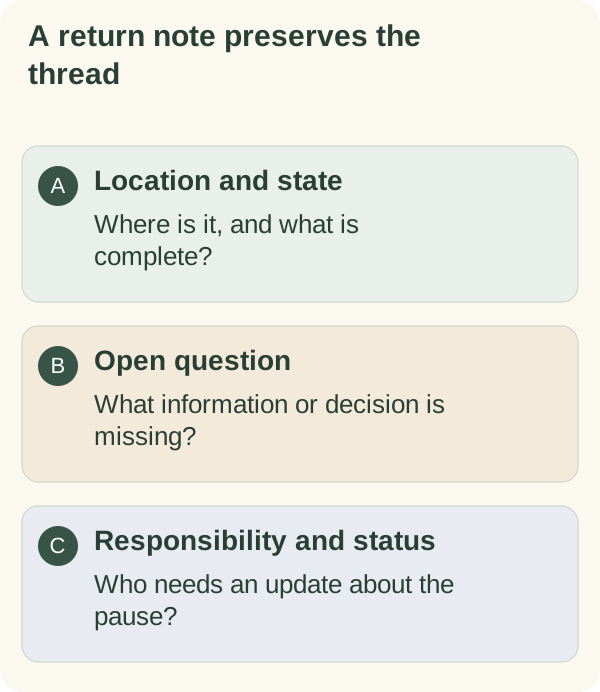
The second card in the Smaller-day planning cards, "Pause with a return note", has lines for where the work is, what is unresolved and who needs an update.
Questions people often ask
Do I need a date to come back? Only if something outside your control sets one, such as a form that expires. For optional projects an undated note is fine.
Where should I keep the note? With the project: on the box, in the first page of the document, or in the folder. A note you cannot find is no help.
How long should it be? Five lines is usually enough. If you need more, the project may have several open decisions worth listing separately.
What if I never come back to it? That is a legitimate outcome. A closing note lets you stop thinking of it as unfinished.