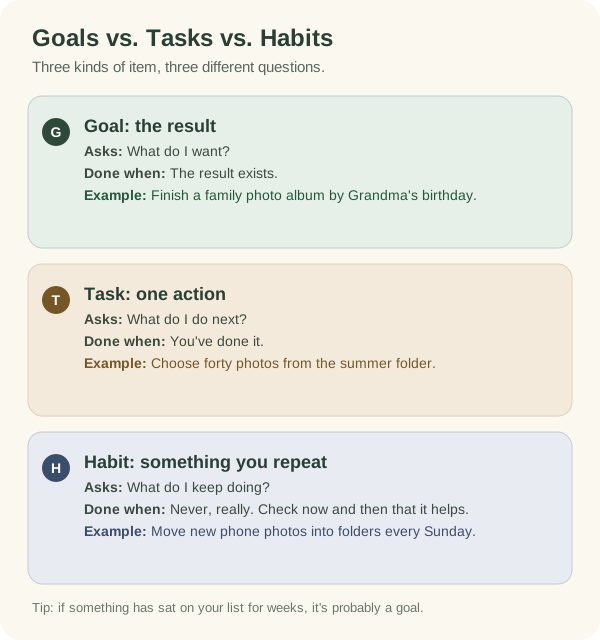
A goal is a result you want. A task is one action with a clear end. A habit is something you do again and again. Once you know which is which, planning gets easier, because each one answers a different question: what do I want, what do I do next, and what do I keep doing?
Side by side
We'll use one made-up project for all three: a family photo album.
Goal: the result you want
"Finish a printed photo album of last year in time for Grandma's birthday." A goal describes something that will exist or be true. It can take days, weeks or longer. You can't do a goal in one go. You get there through smaller actions.
Task: one action with a clear end
"Choose forty photos from the summer folder." A task starts with a verb and has an obvious finish. Most fit in one sitting. If a task feels impossible to start, it's often a goal in disguise.
Habit: something you repeat
"Move new phone photos into dated folders every Sunday evening." A habit has a rhythm instead of an end. It keeps things from piling up again. The question for a habit is whether it's still happening and still worth it.
Why it matters
Goals on a to-do list get stuck. "Finish the photo album" can sit on a list for weeks, because no single action finishes it. Write it as a goal, add a few milestones, then pick one task. Now you have somewhere to start. The goal breakdown guide walks you through it.
Tasks turned into habits cause guilt. Say "sort photos" becomes a daily rule when it only needed doing once. Every missed day starts to feel like you've slipped. Some things only need doing once.
Habits treated as tasks get forgotten. You tick off "back up photos" once and forget about it. Six months later, nothing new is backed up. If something needs repeating, give it a rhythm and a way to notice when it stops.
How they fit together
Most goals use all three:
- Milestones split the goal into checkpoints: photos chosen, layout done, album ordered.
- Tasks get you from one checkpoint to the next: choose forty photos, write captions, upload to the print shop.
- Habits keep the background work going: the Sunday photo-sorting session that stops the pile growing back.
The milestones guide shows how to pick checkpoints you'll recognise when you reach them.
Sort your list in two minutes
Take your to-do list, or the five things on your mind right now. Ask three questions about each one:
One item at a time
- Does one action finish it?
Then it's a task. Keep it, and give it a time if it matters this week.
- Is it a result that needs several actions?
Then it's a goal. Write the result in one sentence and pick its first task.
- Does it only help if you keep doing it?
Then it's a habit. Pick a rhythm you can keep and a time to check how it's going.
Here's what a sorted list might look like:
- "Get fit" turns into a goal ("Walk to work twice a week by December"), a habit ("Walk on Tuesdays and Thursdays") and a task ("Check the walking route on a map tonight").
- "Call the bank" stays a task.
- "Read more" turns into a habit ("Ten pages before bed on weekdays"). Check after a month whether it's working.
Some items won't fit any of the three. They might be worries or wishes. Writing them down somewhere else can be enough for now.
In the Armored Kitten companion
If you use the companion on Telegram, it keeps goals and habits apart too. The goal tutorial covers goals and their steps. The habits tutorial covers things you repeat. Use whichever fits the item you just sorted.