Do not start a postponed course with the first lesson. Start with one short orientation session: log in, read the outline, check deadlines and access dates, and find the first exercise. That session usually shows what was really holding you back, whether it was an unclear first step, an access problem or a course that no longer fits. End it with one of three decisions: start this week with a named first action, start on a set date, or let the course go.
Why a course stays unopened
Most advice on this says to just begin, or to find a study partner. Those can help once you know what you are starting. A course that has sat unopened for weeks or months is usually stuck on something more specific:
- The first step is unclear. "Do the course" is not an action. Without a named first lesson or exercise, every reminder asks for a decision you have not made.
- Access is uncertain. You are not sure the login works, whether the access period has ended or which version of the course you enrolled on.
- The workload is unknown. You suspect it is bigger than your week can hold, so you avoid finding out.
- The course no longer fits. Your job, interests or circumstances changed after you signed up.
Each of these is answered by looking, which is why the first session is orientation.
Run an orientation session
Keep it short and give it a clear end: you are done when you can fill in the start card below. During the session:
- Log in and confirm you can open the course on the device you will use. If you cannot, contact the provider's support now and stop there for today.
- Read the outline, module list or syllabus. Notice how the course is organised and where assessments sit.
- Check dates. Look for access end dates, enrolment deadlines, live sessions and assessment due dates on the provider's current pages, not in an old email or advert.
- Check prerequisites and materials, such as software, books or prior knowledge the course expects.
- Find the first exercise. Not the first video: the first thing the course asks you to do.
Estimate the workload honestly
Video running time is the easiest number to see and the least complete. Look at what each module contains and list it in a row: videos, readings, exercises, quizzes, projects. Note any workload guidance the provider gives. If there is a fixed deadline, compare that with the openings you really have in the weeks before it.
This page does not predict how long the course will take you; that depends on you, the course and your week. The point is to see enough to make a decision rather than avoiding the question.
A course start card you can copy
Course:               ________________
Provider and where I log in: ________________ (no passwords here)
Access works?         yes / no, contacted support on ______
Access ends:          ______
Fixed dates:          live sessions ______ ; assessments due ______
Prerequisites/materials: ________________ ; ready? yes / no
Module 1 contains:    videos ___ readings ___ exercises ___ other ___
First exercise:       ________________
Decision:             start this week / start on ______ / let it go
First action:         ________________ (if starting)
Resume at:            ________________
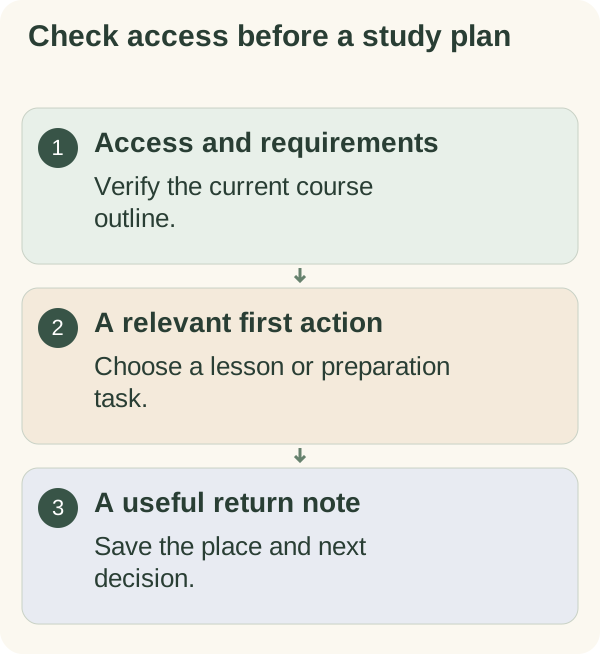
Open the course deliberately
- Find:
locate the correct course and current outline.
- Check:
confirm access, prerequisites and relevant deadlines.
- Choose:
identify the first lesson, exercise or required preparation.
- Decide:
start this week, start on a date, or let the course go.
- Resume:
record the first action or the place to return.
Example: Alex and the course bought in January
Here is a made-up example to show how it can work. Alex had signed up for a self-paced online course in project management at the start of the year. By autumn it had not been opened. The reminder emails had become something Alex deleted without reading.
Alex blocked out an orientation session on a quiet evening, with the start card printed. Logging in worked. The outline showed eight modules, each with videos, a reading and a short written exercise. The course page said access would end at the end of the year, which Alex had forgotten. The first exercise asked for a one-page description of a project from your own work.
That exercise was the real obstacle. Alex had been dreading "studying" but writing about a real project felt manageable. The decision was to start that week. The first action was "write three sentences about the office move project", not "watch module 1".
What changed after trying it: Alex finished module 1 within the following fortnight and used the daily goal calculator to spread the remaining modules across the weeks left before access ended, choosing two study days a week. Alex also unsubscribed from the course's daily reminder emails and set one personal reminder for those two days instead.
When the course you postponed has changed under you
Starting guides usually assume the course is waiting exactly as you left it. After a long delay, that is often not true.
- If your access has expired or is about to, check the provider's terms for extensions or transfers and ask support directly. Decide about the money separately from the learning; a refund or extension is a question for the provider.
- If a cohort-based course has moved ahead, ask whether you can join a later cohort or catch up through recordings, rather than trying to cover several weeks at once.
- If the course was required by your employer, check the actual deadline and whether study time is allowed during working hours, and talk to your manager if the timing no longer works.
- If the course content was updated, check whether your enrolment covers the new version and whether old notes or exercises still apply.
- If the course no longer fits your goals, letting it go is a legitimate decision. Record it on the card so the course stops sitting on your list as an unfinished task.
A message to a provider can be short:
"Hello, I enrolled on ________ on ________ but haven't been able to start.
Could you confirm when my access ends, whether any deadlines apply to me,
and whether there is an option to ________ (extend / join a later group /
switch to the current version)? Thank you."
Save the next opening
Finish every session, including orientation, with the place to resume and the next action. If you decided to let the course go, write that down and remove its reminders. An honest "no" frees attention for something you do want to learn.
Turning a vague "I should do that course" into one orientation session and one first action is the kind of manageable step the habits and goals section is built on: you look at what is really there, then choose the next move from that.
Use start a task to choose the opening move. The daily goal calculator can compare a defined workload with chosen workdays once you have reliable information about both.
Use the materials, first-action and return-note fields in the Practice session planner after checking the course's actual access and instructions.
Questions people often ask
Should I start from module 1 if I already know some of it? Check the outline. Some courses let you skip ahead or take a quick check; others build on early modules. Follow the course's own guidance.
What if the first exercise feels too hard? Write down what you do not understand and look for help through the course's forum, support or tutor. A clear question is a fine first action.
Is it worth finishing a course I have paid for but no longer need? The money is spent either way. Decide based on whether the course is still useful to you now.
How do I stop postponing again after I start? End each session with a written first action for next time, so that each restart begins with a decision you have already made.