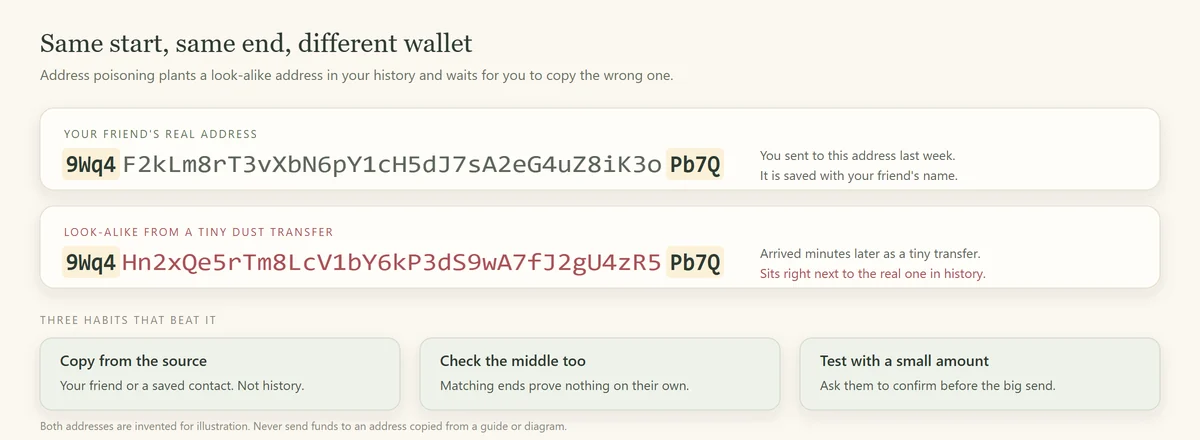
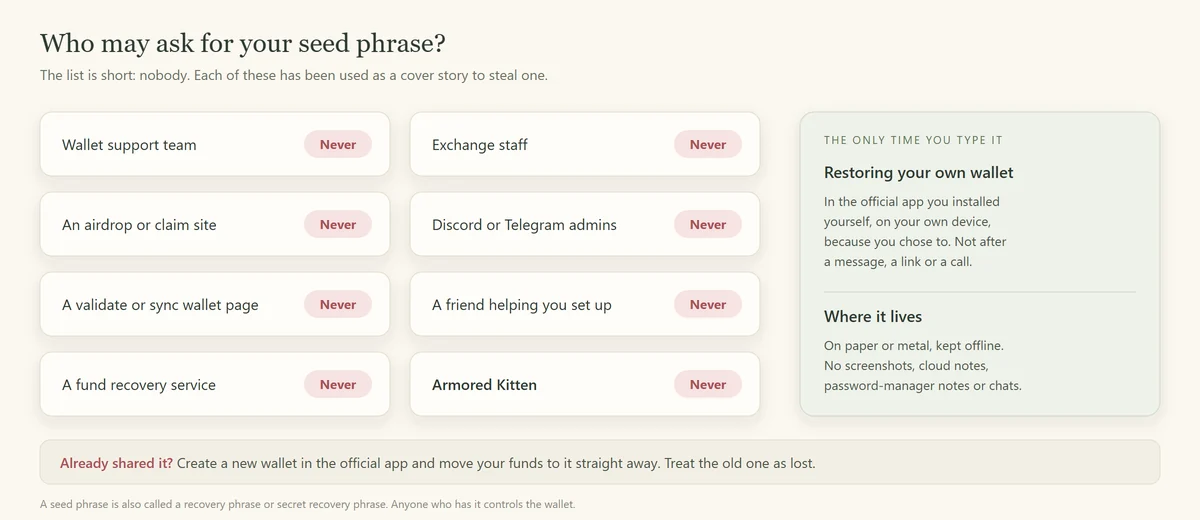
A crypto phishing link takes you to a copy of a site you trust, then asks for something that gives away your funds: your seed phrase, a wallet signature or your exchange login. You can beat almost all of them with one habit, opening crypto sites only from your own bookmarks, and one skill, reading a web address from the right.
This guide shows what phishing links want, where they hide, how to read an address in five seconds, and exactly what to do if you've already clicked one.
What a crypto phishing link is after
Every phishing page wants one of four things. Knowing which one helps you see the trap.
- Your seed phrase. A form that asks you to "validate", "sync" or "restore" your wallet. Whoever gets the words gets the wallet. Our seed phrase scams guide covers this one in depth.
- A signature. The page looks like a normal app. You connect, click "Claim" or "Swap", and your wallet asks you to approve a transaction. That transaction actually sends your tokens to the attacker. Kits built to do this are called wallet drainers.
- Your exchange login. A copy of an exchange sign-in page captures your password and the two-factor code you type next, then logs in as you.
- An install. A fake wallet app or browser extension that behaves like the real one, except that it sends your keys elsewhere.
Where crypto phishing links show up
They rarely arrive looking suspicious. They arrive where you already expect a link.
Sponsored search results
You search for a wallet or a DEX, and the first result is an ad with the right name and logo. Scammers buy ads against popular crypto brands, and Phantom's advice is blunt: never visit apps or airdrops from paid search results. A result at the top of the page proves nothing. Type the address yourself or use a bookmark.
Replies, DMs and hacked channels
On X, scam accounts copy a project's name and picture and reply under its real posts with "claim" links. On Discord and Telegram, "admins" DM you, or a real server's announcement channel gets hacked and posts a mint or airdrop link. A link in a channel you trust is still worth checking, because the channel itself can be compromised.
Emails and texts
"Unusual login detected", "your wallet will be suspended", "complete KYC to keep access". These copy the style of exchange emails and push you to a sign-in page. Open the app or type the address instead of tapping the button.
QR codes
A QR code is a link you can't read until it's opened. The FTC has warned that scammers hide harmful links in QR codes on flyers, emails and parking meters. Check the address your phone shows before you open it.
Spam tokens and NFTs in your wallet
On Solana, anyone can send tokens or NFTs to your address. Some arrive with names like "Claim 500 USDC at" plus a web address, or an image showing a reward. Phantom says it automatically hides tokens with a URL in the name, but not every wallet does, and NFTs can carry the same bait in their pictures. The token is bait. Visiting the site and "claiming" is what hurts you. Leave unknown tokens alone, and hide or burn them only from inside your wallet app.
How to read a link in five seconds
This is the skill that does most of the work.
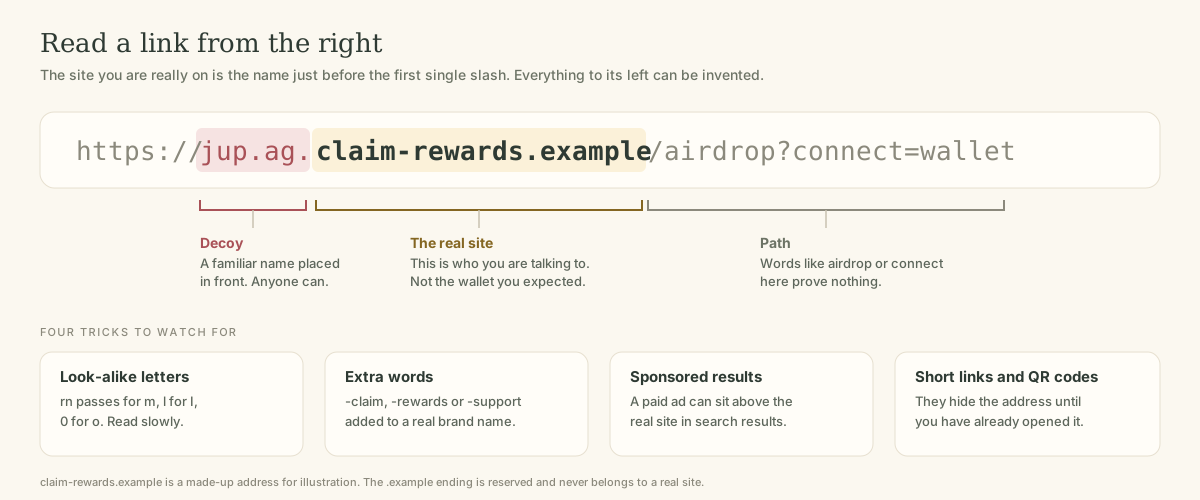
Read a web address
- Skip past https://.
It only tells you the connection is encrypted.
- Find the first single slash
after that. Ignore everything to its right; paths like /airdrop or /claim prove nothing.
- Read the domain from the right.
Take the ending (.com, .ag, .io) and the word just before it. That pair is the site you're on. Anything further left, like jup.ag. in the diagram, is a label the owner chose.
- Spell it out slowly.
CISA warns that a fake site may use a variation in spelling or a different domain ending. Look for swapped or doubled letters, "rn" standing in for "m", a zero instead of an "o", and extra words like -claim, -support or -rewards.
- Compare with your bookmark.
If it doesn't match the address you saved, close the tab.
On a phone, tap the address bar to see the full address. Many mobile browsers shorten it, which hides the decoy part.
Connecting is not the same as signing
Beginners often worry that connecting a wallet was the mistake. It usually wasn't.
Connecting shares your public wallet address with the site, like telling a shop your account number so it can show your balance. On its own it can't move funds. Still, disconnect from sites you don't trust in your wallet's settings.
Signing a transaction is the moment of risk. A single Solana transaction can bundle several actions: send this token, send that one, close an account, hand control of something to another address. A drainer page dresses that bundle up as "Claim reward" or "Verify wallet".
Most Solana wallets simulate a transaction and preview its effects before you approve. Phantom, for example, describes its previews as a firewall that identifies malicious transactions, and it shows a warning when it can't simulate a transaction. Solflare advises rejecting unusual permission requests, such as access to all your tokens. Before you approve, look at what your wallet's preview says will happen:
- Will tokens or SOL leave your wallet that you didn't plan to send?
- Does it mention changing an owner, an authority or a delegate?
- Has your wallet shown a warning, a red banner or "this site may be malicious"?
- Does the site name in the prompt match the site you meant to use?
If any answer worries you, press Reject. A real app will let you try again. A scam can't do anything without your approval.
Red flags at a glance
- A link arrived in a DM, a reply or an email you didn't expect.
- There's a countdown, a limited number of claims or a threat to suspend your account.
- The site asks for your seed phrase at any point.
- The wallet prompt moves more than you intended, or your wallet shows a warning.
- The address has extra words, odd spelling or an unusual ending.
- The site name is right but you reached it from an ad.
- A "support agent" sends you a link to fix a problem.
I clicked a phishing link. What now?
How bad it is depends on how far you went. Work down from the top and stop at the line that matches.
If you clicked
- You only opened the page.
Close it. Simply opening a page rarely does harm on an updated browser and phone. Don't download anything it offers.
- You connected your wallet but signed nothing.
Disconnect the site in your wallet's connected-apps settings. Your funds weren't moved by connecting alone. Stay alert for follow-up DMs.
- You signed a transaction.
Check your wallet's activity. If tokens left, they're probably gone. Move everything that's left to a new wallet you create in the official app, because the attacker may have gained ongoing permissions over some accounts.
- You typed your seed phrase.
Treat the wallet as fully compromised right now. Create a brand-new wallet, with a new seed phrase, in the official app and move what remains immediately. Never reuse the old phrase.
- You entered an exchange password.
Change it from the official app or site, reset two-factor sign-in, sign out other sessions and contact the exchange's support through its own help centre.
- Report it.
In the US, use IC3 and ReportFraud.ftc.gov. In the UK, use Report Fraud. Elsewhere, use your national fraud reporting service. Note the site address, transaction signatures and screenshots first.
Anyone who contacts you afterwards offering to recover the funds is running a second scam. Our guide to social scams in crypto explains recovery scams.
What genuine Armored Kitten links look like
We'd rather you check us than trust us, so here is how our links behave.
- Greeting links open on our own site, armoredkitten.stonkbuilder.com, in a normal browser. Reading a card never needs a wallet.
- Token gifts are claimed in the Jupiter Mobile app, not on a separate claim website. Armored Kitten is not affiliated with Jupiter.
- We never ask for a seed phrase or private key, and we never DM you about a gift on Telegram, Discord or X.
- The recipient is never asked to pay to open a card or receive a gift.
Until a gift is claimed or returned, the service keeps an encrypted copy of its claim code. Anyone with that code, or with the private greeting link, can claim the gift. That's why a real greeting link should reach you privately and from someone you know. If a "gift" link breaks any of the rules above, it isn't ours. Our guide is gifting crypto safe? shows how to check a gift that seems too sudden.
Frequently asked questions
Can you get hacked just by clicking a crypto link?
Rarely, if your browser and phone are up to date. The damage usually comes from what you do next: typing a seed phrase, signing a transaction or installing something. Close the page and don't interact further.
Is it safe if the site has a padlock?
No. The padlock means the connection is encrypted, and scam sites get certificates as easily as real ones. Check the domain itself.
How do I report a phishing site?
Report it to the wallet or exchange it imitates, to your browser's unsafe-site reporting tool, and to your national fraud service. In the US, that's ReportFraud.ftc.gov and IC3.
Why did a token I never bought appear in my wallet?
Anyone can send tokens to a Solana address. Unknown tokens with web addresses in their names are common bait. Don't visit the site and don't try to sell or claim it through a link. Hide it in your wallet app.
What's the safest way to find a crypto app's real address?
Use a bookmark you saved earlier, the official app store listing linked from the project's own website, or the project's verified account. Don't rely on the first search result.
The one-line version
Read the address from the right, open crypto sites from your own bookmarks, and never sign something you don't understand. For the bigger picture, start with our field guide to crypto scams for beginners.
Plain-language disclaimer: this guide is general safety information, not security advice for your specific situation. Wallet features and warnings change, so check your wallet's own help pages. Armored Kitten never asks for your seed phrase.
Armored Kitten is an independent greeting studio and is not affiliated with or endorsed by Jupiter. Token gifts are optional, can change in value, and are not investment advice. Check the rules that apply where you live.